GNOME GMail (Google GMail) Notifier is an awesome tool for GNOME/Linux users if you are addicted to checking mails every few minutes. GMail Notifier solves a bit of your problems by notifying about multiple gmail accounts. One more plus point is that it can display GMail Notifications for new mails in accounts for which you are using Google Apps. Below is a step by step howto on installing and configuring GMail Notifier in Fedora (may apply to other distros as well).
Install GNOME GMail Notifier
You can download and install it from GNOME GMail notifier home page or just use yum
[root@fedora ~]$ yum install gnome-gmail-notifier |
Launch Gmail Notifier
If installation was successful, go to Applications -> Internet -> Gmail Notifier.

Open Preferences
Right click on Email icon in taskbar and click Preferences.
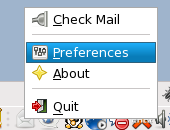
Select Preferences
Set inbox update time to 1 minute. Check display notifications for new messages and errors. Also select a sound to play for new mails.
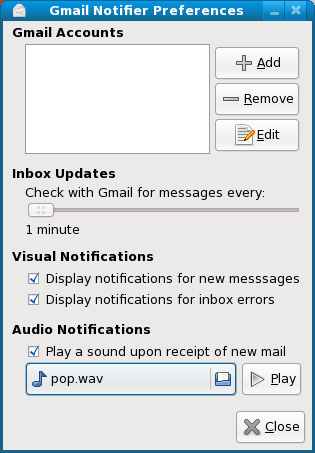
Add GMail Account
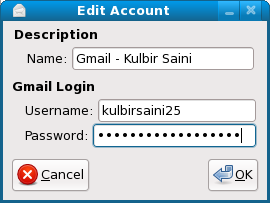
Click Add on preferences window and add your GMail account.
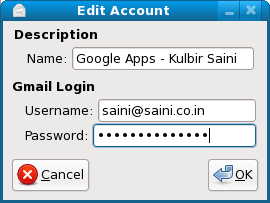
Add Mail Account (Google Apps) (Optional)
If you don’t know what Google Apps is, leave this step. If you do know, then add your mail account.
Check Mail
If you can’t wait for 1 minutes to see GMail Notifier in action, just right click on email icon in taskbar and click Check Mail.
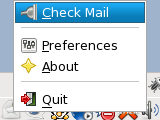
Mail Notifications
Whenever you get a new mail, you’ll have bubble like the one in image below and a sound will also be played.
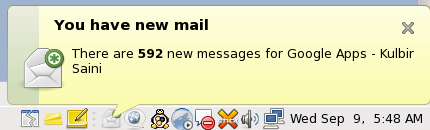
Enjoy the notifications 🙂
We offer all kinds of certification exams including MB4-219 and MB6-203 certifications. Our guaranteed MB6-822 are freely accessible all around the world of 70-181 with 70-291.
I currently use mail-notification (yum install mail-notification) for Gmail notifications, what is the advantage of using this?
I’ll have to use mail-notification for sometime. I’ll try to post a comparison.
Nice post, good to see a fedora support, gofedora
Thanks Radhe.
Does this work with http proxy?
Yes, it does.
i’m glad you’ve found the notifier useful. i’m getting ready to release a new version of the notifier which is quite improved. be on the lookout for version 0.10.1 at http://notifier.geekysuavo.org/ within the next few weeks!
~ brad.
Hey brad, thanks for the update. I have been using it ever since I found it 🙂
Does this also make a notification pop-up when someone sends you a chat message in Gmail chat? If not, could you recommend a way to do this? I use CentOS Linux (based on RedHat) with gnome 2.16.
Thanks
Oh… Good post this what im looking for. TY