While testing a piece of code for my squid plugin, I ended up changing permissions of /tmp/ directory to 0755. A few minutes later (after making changes to the code), I tried committing it to fedorapeople.org and got this error
1 2 3 4 5 6 | [project@bordeaux youtube_cache]$ git push --all ssh://kulbirsaini@fedorapeople.org/~kulbirsaini/public_git/youtube_cache.git Enter passphrase for key '/home2/Studies/project/.ssh/id_rsa': ssh_control_listener bind(): Permission denied fatal: The remote end hung up unexpectedly error: failed to push to 'ssh://kulbirsaini@fedorapeople.org/~kulbirsaini/public_git/youtube_cache.git' [project@bordeaux youtube_cache]$ |
Well, I couldn’t understand the error and jumped to #fedora-admin. I pasted the error on pastebin. Almost a minute laster, while trying to conquer the error, I Googled the exact error and I was damn surprised to see the paste as first result. What an indexing speed Google has??? See the screen shot for proof 🙂
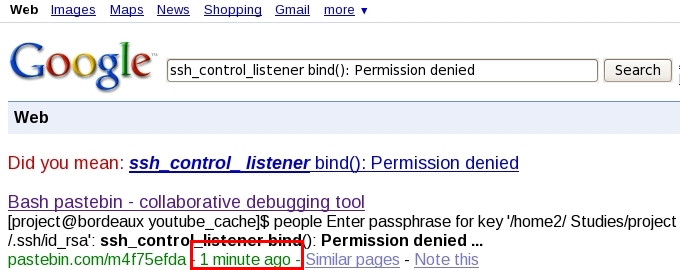
In #fedora-admin ricky confirmed that nothing was wrong on server side and it should be a local problem with my machine or proxy server at my insti border. A few minutes later, I reliazed the /tmp/ permission thing and changing permissions back to 0777 fixed everything 🙂
Amazing!!
That ought to be 1777 to restore the sticky bit or you are already in for a nasty surprise soonish….
Thanks a ton. I am not really ready for surprises 🙂
[…] interesting is that it already shows it on the first results page. Update Already been beaten Google is the Fastest Marco Antonio Islas Cruz | Friday 17 October 2008 1:26pm | general, google | 0 comments […]
Isnt there any chance that google was going around looking for changes , when you actually created that page ?
I am not denying. It was shear luck 😀
OMG, I don’ friggin’ believe this!
The default ‘Your Name’ which comes before posting a comment is ‘Anonymouse’. While your opinion about people who write anonymous comments are wholeheartedly respected and even agreed with, I also feel that this way you’re kinda assuming a person to fall in the above category.
I doubt if Jeevan Vidhya would approve of such assumptions. Such assumptions don’t make for harmony in society.
And neither does the word verification at the end of the comment posting process, where you again seem to be assuming that someone in the society intends to cause harm to your happiness by spamming your blog with non-constructive comments.
You are too much infected with Jeevan Vidya.
Hmm, I just repeated your exact Google search and your pastebin.com page did not come up in the results at all.
Could it be that you have enabled Google Web History ( http://www.google.com/support/accounts/bin/answer.py?answer=54068&topic=14149 ), and Google transparently searched your history and added to the regular search results.
Can you repeat the experiment with another newly created pagebin.com page?
I have google history enabled. It may be due to that.